Your page
as a QR code.
The Share sheet shows your QR. Print it, then count the scans.
The QR
What the QR
does.
It is your tepek.me link, drawn as a code.
- Opens your page
- Any phone camera reads it.
- Counts as a QR scan
- Insights keeps scans apart from taps.
- One per NFC
- Share shows the QR of the NFC you picked.
- In Google Wallet
- On Lifetime, your pass carries it.
From Share
to the counter.
Open Share
In the app or at tepek.me/app.
Take a screenshot
The QR sits in the middle.
Print it
A sticker, a menu, a banner.
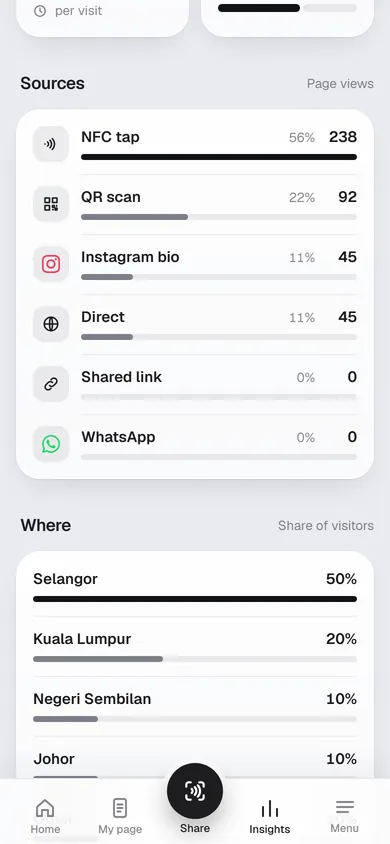
Watch the scans
Under QR scan, in Insights.
Insights
Scans, apart
from taps.
- NFC tap
- A tap on your card or keychain.
- QR scan
- A scan of the QR from Share.
- Shared link
- A link you sent from Share.
- Instagram bio
- A tap on your Instagram bio link.
- A link opened in a WhatsApp chat.
- Direct
- Typed in, or anywhere else.
Pricing
Free and Lifetime
The QR is on both.
Start on Free. Lifetime is RM 29, paid once in the Tepek app.
| What you get | FreeRM 0 | LifetimeRM 29, once |
|---|---|---|
| QR code in the Share sheet | Yes | Yes |
| Google Wallet pass with your QR | No | Yes |
| Your page, links and social icons | Yes | Yes |
| Insights | Last 7 days | Last 30 days |
Lifetime is bought in the Tepek app for Android.
If I change my page, do I need a new QR?
No. The QR opens your tepek.me link, so a printed QR keeps working while you change the page behind it.
Can each NFC have its own QR?
Yes. With an NFC picked, Share shows the QR of that NFC’s page, and its scans count for that NFC in Insights.
How do I know people scanned it?
Scans carry a small tag in the link, so Insights lists them as QR scan, apart from NFC taps and shared links.
Can I keep the QR on my phone?
On Lifetime, Add to Google Wallet saves your page as a pass, and the pass shows your QR.
Your name is waiting