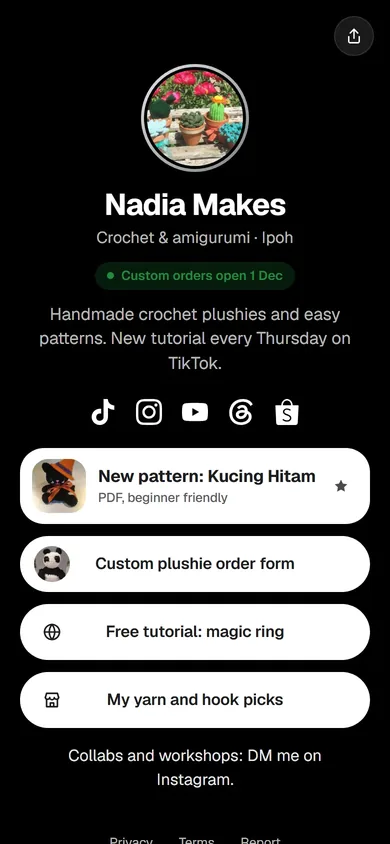
Instagram and TikTok give you one place for a link, on your profile. A Tepek page turns that one link into all of them: your shop, your WhatsApp, your latest video, your order form. This guide shows where to paste it on each app, which address to paste, and how to see which app sends you the most visitors.
Which address to use
Use your plain address, the same one under the QR code in the Share sheet:
tepek.me/yournameType it yourself rather than pasting the one from Copy link.
The reason is Insights. Copy link adds a small tag to the end (?src=share) so Tepek can count the visits as Shared link, which is right when you send it in a chat. In your bio you want the visits counted by app instead: with the plain address, visits from Instagram show up as Instagram bio.
On Instagram
These are Instagram’s own screens, so the words can move a little between versions:
- Go to your profile and tap Edit profile.
- Tap Links, then Add external link.
- Type
tepek.me/yournamein the URL field. A title such as “Order and contact” is optional. - Tap Done, then check your profile: the link sits under your bio.
In your posts and Reels, “link in bio” now means one thing. Say what they will find there: “menu and WhatsApp in bio” tells them more than “link in bio”.
On TikTok
TikTok’s Website field is in Edit profile too. TikTok decides which accounts get it, so not every profile has it. If yours does:
- Go to your profile and tap Edit profile.
- Tap Website and type
tepek.me/yourname. - Save, and open your profile as a visitor would to check the link is there.
No Website field yet? Put tepek.me/yourname in your bio text. It will not be tappable, but people can still type it, and it is short enough to remember.
Make the top of your page match
Someone who taps your bio link has just watched one of your videos, so the first thing on your page should be what that video was about. Open My page, then Links & blocks, and drag that link to the top. Turn on Featured for a bigger button with a subtitle, like “New pattern, PDF”.
Change it when your content changes. The address in your bio stays the same; only the page behind it moves, so you never have to edit your profile again.
See which app sends you visitors
Open Insights, then the Visitors tab. Sources splits your page views by where they came from:
- NFC tap: someone tapped your Tepek card.
- QR scan: someone scanned the QR from your Share sheet.
- Shared link: the address from Copy link or the WhatsApp button in the Share sheet.
- Instagram bio: a visit from Instagram, through your bio link or anywhere else in the app.
- WhatsApp: a link opened from WhatsApp.
- Direct: everything Tepek cannot tell apart, including visits from TikTok and from someone typing your address.
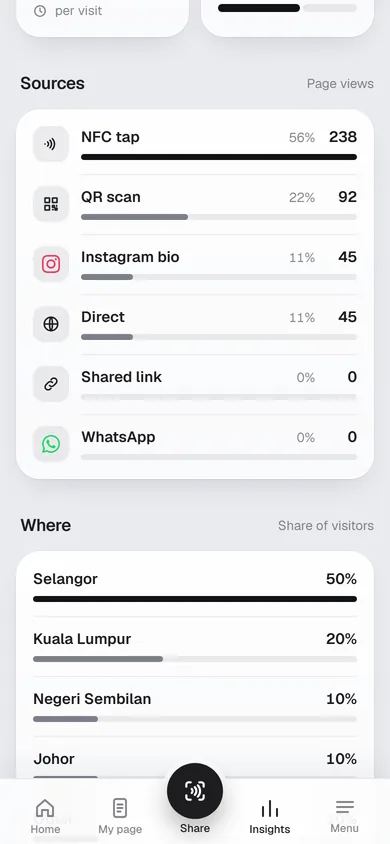
TikTok visits land in Direct because TikTok does not say where a visit came from. To see what a TikTok post does, look at Direct and the views chart on Overview on the day you post, and compare it with a quiet day. Reading your Tepek Insights explains each number.
A few tips
- Use the same address on every app, so your followers learn one link.
- Keep your Tepek page short at the top: a photo, one line, and two or three buttons are enough for someone arriving from a video.
- Mention the page out loud in videos. “Tepek dot me slash” and your name is easy to say and easy to type.