A link-in-bio page is one address that holds everything you want people to find: your WhatsApp, your Instagram, your Shopee shop, your menu or your rates. On Tepek it lives at tepek.me/yourname. You can make it on your phone or a computer, and this guide follows the screens as they are today, from sign-up to sharing.
Before you start
- A name for your address. It becomes
tepek.me/yourname, so pick something people can type: lower-case letters, numbers, dots and underscores, at least 3 characters. - A photo or a logo, if you have one. You can add it later.
- Your usernames on Instagram and TikTok, and the number your customers already WhatsApp you on.
1. Create your account
Open tepek.me/signup and sign up with Google, or with your email and a password. An email account gets a message to confirm the address first. The confirm screen checks by itself every few seconds, so after you tap the link in your inbox you can go straight back to it. A Google account skips this step.
2. Make it yours
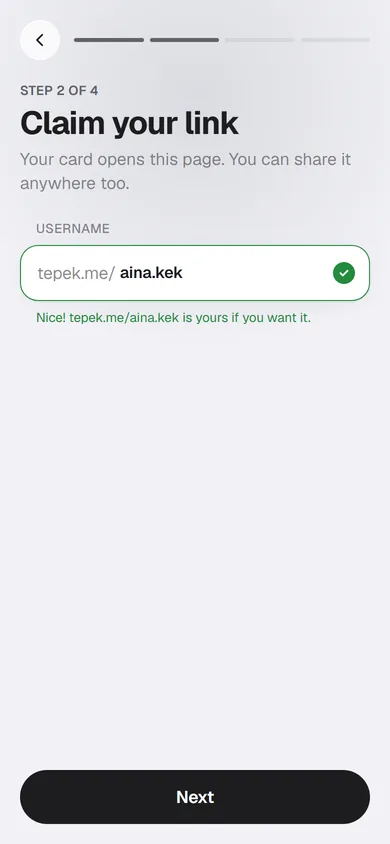
Setup has four steps, and the bar at the top shows where you are. The first, Make it yours, is what people see when they open your page: a photo (or one of five colours if you have no photo yet), your display name, and a short bio of up to 80 characters.
Keep the bio to what you do and where you are. “Kek lapis Sarawak, baked to order” tells a visitor more than a slogan does.
3. Claim your link
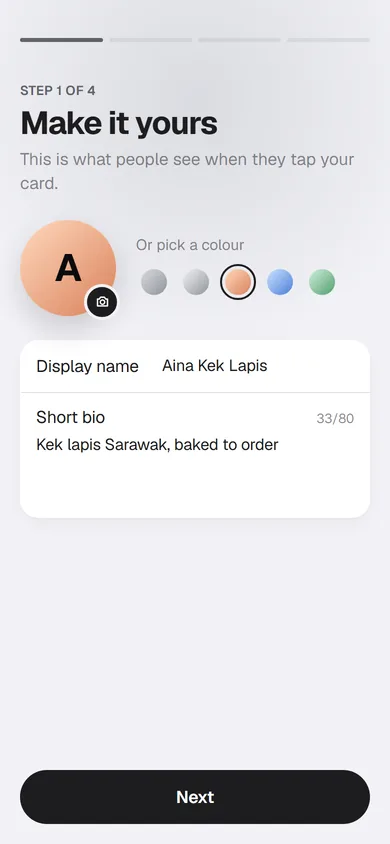
Type the username you want. Tepek checks it as you type and answers at once: “Nice! tepek.me/yourname is yours if you want it”, or “Taken already” with three suggestions you can tap. Press Next and the name is yours: your page now exists, with the name, bio and photo from step 1.
You can change the username later in Edit profile, under Page link. If you do, update it everywhere you have shared it.
4. Add your links
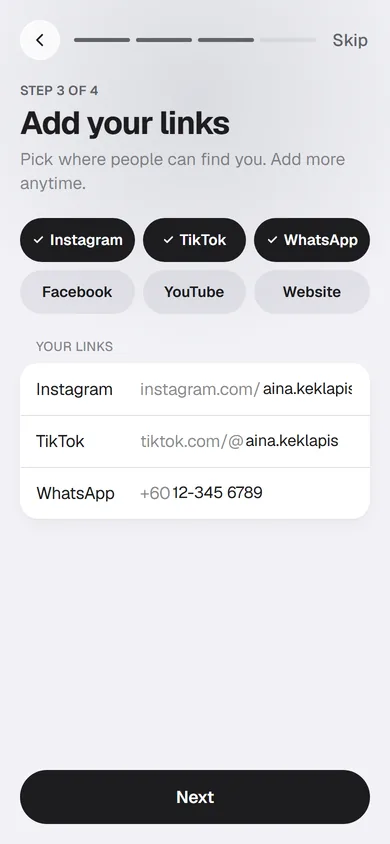
Tap the platforms you use: Instagram, TikTok, WhatsApp, Facebook, YouTube and Website. Instagram, WhatsApp and TikTok are picked for you. Type only your username, not the whole address: Tepek puts instagram.com/ or tiktok.com/@ in front by itself. WhatsApp takes your Malaysian number after +60.
Not ready? Press Skip. You can add every link later, and many more besides.
5. Link your card, or skip it
If you have a Tepek NFC card, press Add my card and type the code printed on its back. It has 8 letters and numbers, like K2P7 QC9X. No card? Press Skip: your page works without one, as a link and as a QR code. You can add a card any time from Add NFC; Set up your Tepek NFC card explains the ways.
Setup ends on You’re live! with a small preview of your page and its address. Press Go to my Home.
6. Add blocks
Everything on your page is a block, shown in the order you set. Open My page, then Links & blocks, and press Add block.
At the top is Preset. Tap it for the packs: a few empty blocks in one tap, added at the end of your page. Personal adds a link, social icons, your contact details and a Save contact button. The others, Food stall, Online shop and Services, come with Lifetime.
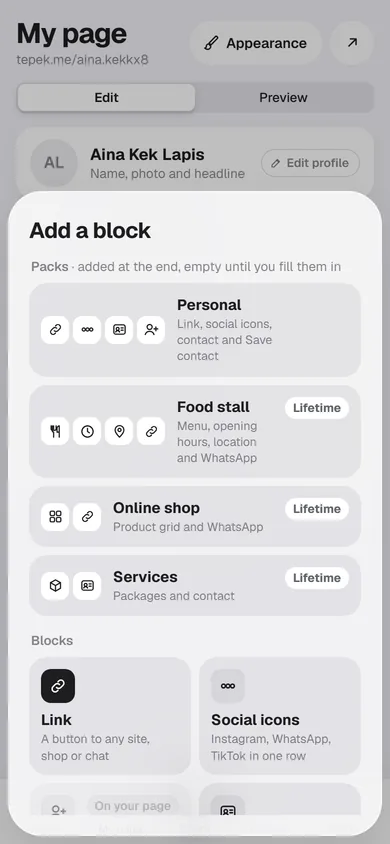
Below Preset are single blocks: Link, Social icons, Save contact, Contact, File (a PDF up to 10 MB), Section title, Text, Image, Video (YouTube or TikTok, plays on tap), FAQ, Location and Divider. Product grid, Menu, Packages and Opening hours are there too, with a Lifetime tag on Free.
A new block says Not shown yet until you fill it in, so visitors never see an empty button. There is no Save button here: the editor saves by itself a moment after each change. Drag the handle on a block to move it.
7. Pick a look
Appearance changes how the page looks, never what is on it. Start from a preset: Minimal is free, while Cafe, Shop and Portfolio come with Lifetime. Then change the colours, the font, the buttons and the header until it feels like yours, and press Save. Templates shows every preset and pack on a real page.
8. Share it
On Home, press Share my page. You get a QR code, Copy link and a WhatsApp button. Put the address in your Instagram and TikTok bios, print the QR at your counter, and send the link to your regulars. Share your page with a QR code and Put your link in your TikTok and Instagram bio go through each one.
What it costs
Everything in this guide is free. Lifetime is a one-time purchase in the Tepek app that adds the business blocks, the other presets, kad kahwin and 30 days of Insights. Pricing compares the two.